




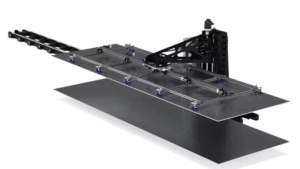
Understanding CNC Router Roller Hold-Down Systems & Automated Material Restraint
Learn how to configure and operate CNC router roller hold-down systems using AXYZ MOVE CNC control software.
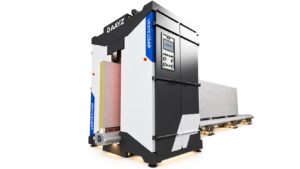
In Lesson 7 of AXYZ MOVE Academy Basics, Michael Zeuener, AXYZ Engineering & Product Manager, demonstrates how roller hold-down settings influence material restraint and machine behaviour during CNC operations.
Through practical software demonstrations and a synchronized CNC machine digital twin, you’ll explore how to configure material dimensions, select the appropriate pressure foot, manage roller settings, and observe how automated roller movements respond throughout a complete machining cycle.
The lesson uses an 8-foot OSB sheet to demonstrate front and rear roller operation, including material positioning, automated lowering, edge clearance, and the return to a raised position after the operation.
What You’ll Learn
-
Understanding CNC Roller Hold-Down Systems: Explore the purpose of roller hold-down equipment and its role in securing sheet materials during CNC cutting and routing operations.
-
Material Length & Sheet Configuration: Learn how to enter and verify material dimensions within AXYZ MOVE and confirm that the software settings match the actual material positioned on the CNC table.
-
High Capacity Pressure Foot Configuration: Understand how to select the appropriate pressure foot configuration and verify compatibility with the installed hardware.
-
Front Position & Mounting Settings: Learn how mounting position settings influence roller placement and why these values must correspond to the machine’s physical configuration.
-
Manual Roller Operation: Explore the Lower Rollers and Raise Rollers controls, and understand how to enable or disable the roller hold-down system.
-
Automatic Roller Movement: Observe how the front and rear rollers respond independently during a CNC machining operation.
-
Roller Pendulum Settings: Understand the purpose of roller Pendulum configuration and how it differs from other material restraint controls.
-
Material Edge Clearance: Examine how roller positions change as the machine approaches the edges of the material and why appropriate clearance is essential.
-
CNC Machine Response Verification: Learn how to review roller settings, observe simulated machine movement, and confirm the expected roller positions at the end of a production cycle.
Why This Lesson Matters
Maintaining proper material restraint is an important part of accurate and efficient CNC router operation.
When machining large sheets of plywood, OSB, wood panels, and other materials, unwanted movement can affect cutting accuracy, finished part quality, and production consistency.
Roller hold-down equipment provides an additional method of material restraint, particularly for manufacturing applications where sheet positioning and controlled machine movement are essential.
Automated roller systems can also support efficient production by reducing the need for manual intervention during supported machining workflows.
AXYZ MOVE brings roller configuration, material settings, and machine controls together in one software interface, helping operators understand and manage these functions more effectively.
By learning how roller hold-down settings relate to actual machine movement, operators can better prepare cutting jobs and recognize the importance of correct hardware configuration, material dimensions, and operating clearances.
By the End of This Lesson
You’ll understand how to navigate the AXYZ MOVE roller hold-down controls, configure material length and pressure foot settings, manage manual and automatic roller functions, and interpret the expected machine response during a CNC operation.
You’ll also recognize how front and rear rollers operate independently, why mounting positions matter, and what should be verified before starting production.
Continue developing your CNC router operating skills with AXYZ MOVE Academy, where intelligent machine controls and industrial automation support efficient, accurate manufacturing.
Training Note: This lesson demonstrates roller hold-down behaviour using an A2MC training controller and synchronized digital twin. Physical roller movement, material holding performance, and edge clearance must be verified on the installed machine. Available roller configurations and controls depend on the equipment fitted and commissioned for your CNC router.